
Security Camera Has Power but No Video? Use a Swap Test to Find the Fault
IR lights or a power LED only prove that some power is reaching the camera. They do not prove that video or network data is making it back to the recorder.
The fastest way to solve a powered camera with no picture is to stop guessing and isolate the path. First decide whether you have an analog DVR camera or an IP/PoE camera, then use a known-good port, cable, and camera to find out whether the failure follows the camera or stays with the channel.

If a security camera has power but no video, the fault can still be in the camera, video/data cable, connector, recorder port, compatibility/settings, or the power source under load. Do not replace the camera just because its infrared LEDs turn on. A simple swap test can usually tell you which part of the path deserves attention.
Start Here: Analog DVR or IP/PoE NVR?
The troubleshooting path depends on the system. Analog cameras normally use a separate low-voltage power connection plus a coax/BNC video path. PoE cameras use Ethernet, where one cable can carry both network data and electrical power. Mixing those two systems into one checklist causes bad diagnoses.
A camera can receive 12V power and turn on its IR LEDs while the BNC connector, coax cable, DVR channel, or video format still prevents the picture from reaching the recorder.
PoE power reaching a camera does not guarantee that all Ethernet pairs, link negotiation, credentials, addressing, or the video stream are working correctly.
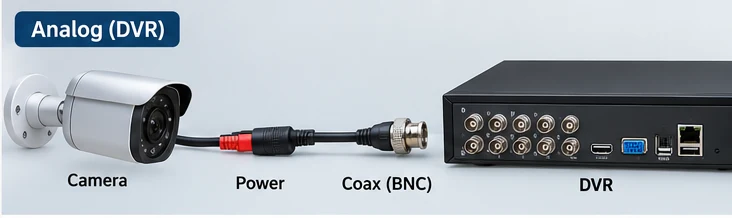
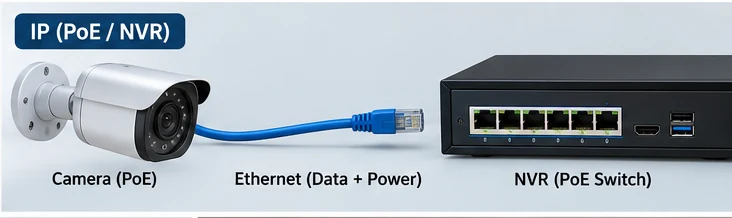
What “Has Power” Actually Proves — and What It Does Not
Seeing red infrared LEDs at night, hearing the IR-cut filter click, or seeing a status light tells you that at least part of the camera electronics is receiving power. That is useful, but it is not the end of the diagnosis.
| What you observe | What it proves | What can still be wrong |
|---|---|---|
| IR LEDs illuminate when lens is covered | The camera is receiving enough power for at least part of the night-vision circuit | Video cable, DVR port, camera image circuit, signal format, or recorder configuration |
| PoE link lights appear | There is some physical/network activity on the port | Bad pairs, unstable cable, addressing, password, stream, compatibility, or camera fault |
| Camera feels warm / status LED is on | Power is reaching the camera electronics | Video or data path can still be broken |
| Camera appears online but live view is blank | Network presence may be established | Stream/codec, permissions, credentials, recorder profile, or camera imaging problem |
Power is only one part of the chain. Always prove the signal or data path separately before deciding that the camera is good.
The Swap Test: The Fastest Way to Isolate the Fault
This is the most useful test in the article because it turns a vague “no video” complaint into a controlled comparison. You need one known-good camera, one known-good recorder port, and ideally one short known-good cable.
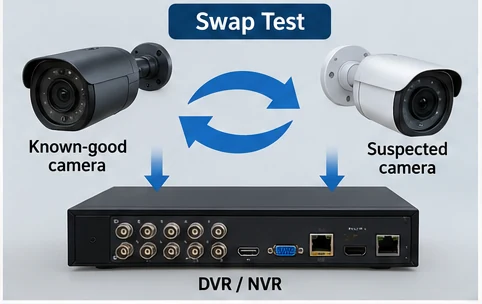
Do the test in this order
Keep the system simple and change one thing at a time. If you move the camera, cable, and port together, you lose the diagnostic value.
The camera is probably not your first suspect. Return to the original port, cable, connector, or channel settings.
The cable run, connector, power path, or original recorder port moves higher on the list.
The camera itself, compatibility, configuration, or its required power becomes a stronger suspect.
The original channel/port or its configuration deserves attention before buying another camera.
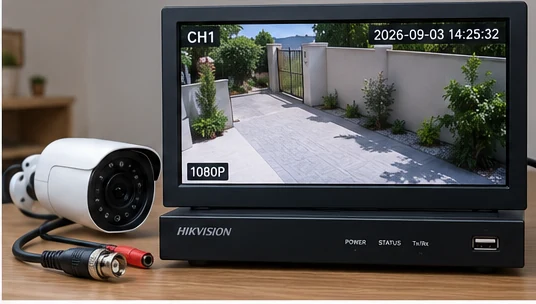
Analog DVR: Check the BNC and Coax Path Before Replacing the Camera
For analog CCTV, a powered camera with no image often means the video path has failed independently of the power path. Lorex and Dahua both include cable, connector, recorder port, camera power, and compatibility checks in their no-video troubleshooting guidance.
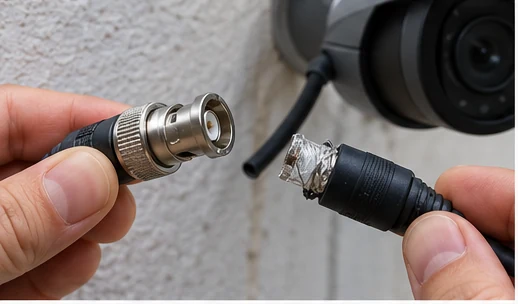
Disconnect and reconnect the video connector firmly. Inspect for a bent center pin, damaged adapter, loose twist-on/crimp connector, corrosion, or a connector that does not lock properly.
Lorex specifically recommends moving a camera to a different DVR/NVR port when a single feed is missing. If the picture appears on another channel, investigate the original channel or settings.
This bypasses the long installed cable. If the camera works close to the recorder, the camera is probably not the first part to replace.
Some DVRs and cameras support multiple analog HD standards while others require the channel type to match. Dahua specifically lists channel type/compatibility as a possible cause of no analog video.
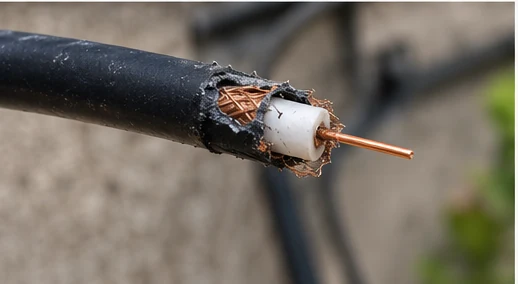
A cable may appear connected but still have poor shielding, a damaged center conductor, excessive loss, moisture intrusion, or an intermittent connector. The short-cable swap test is often more useful than guessing from appearance alone.
PoE/NVR: Power at the Camera Does Not Guarantee a Healthy Data Link
For PoE cameras, Ethernet carries network data and power together, but the fact that the camera powers up does not prove the entire cable and network path is healthy. Reolink documents that PoE cameras use Ethernet for both functions and requires all eight conductors for its standard Ethernet cabling.
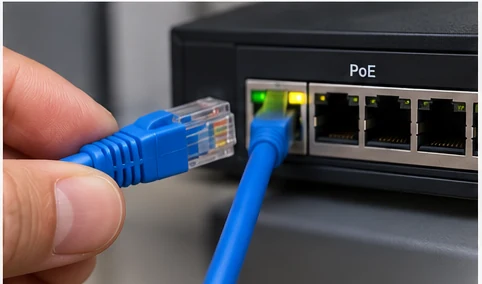
If the recorder or PoE switch provides port LEDs, note whether they appear and whether they remain stable. No link pushes the diagnosis toward the cable, connector, port, or camera network interface.
Move the same camera and cable to a known-good PoE port. Then, if needed, test the camera with a short known-good Ethernet cable close to the recorder.
Lorex notes that exceeding the recorder’s PoE budget can cause video loss. If multiple cameras drop out after adding new hardware, calculate the total camera power requirement instead of blaming several cameras at once.
Move beyond cabling: check credentials, IP address, stream/codec settings, recorder compatibility, sub-stream/main-stream configuration, and firmware/model support.
A directly connected PoE camera and NVR can often provide local live view without internet access. This is useful because it helps separate a local camera/NVR problem from a remote-app or WAN problem.
What About the 12V Power Supply?
On analog systems and some IP cameras that use a separate DC adapter, low-voltage power deserves its own check. A camera may partially power up but become unstable when IR LEDs, heaters, motorized functions, or other internal loads engage.
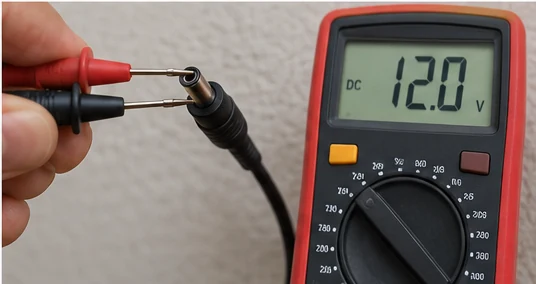
If the camera uses a 12V DC adapter, the safest practical comparison is often to test with a known-good adapter that matches the required voltage and polarity and can supply at least the required current. A correct voltage reading with no load does not always prove an old adapter can maintain that voltage under load.
Do not open a power adapter, mains junction box, PoE switch power supply, or recorder power supply for live measurements. This guide only covers external low-voltage checks and known-good adapter swaps. If mains voltage or internal power-supply work is involved, use a qualified technician.
One Camera Has No Video vs All Cameras Have No Video
This difference prevents wasted work. If one camera fails, start with that channel’s unique camera, cable, port, power, and settings. If all cameras fail together, look for what they share.
Dahua’s troubleshooting guidance for multiple-camera video loss includes insufficient power, bandwidth, cable limitations, settings, and recorder hardware. This is why replacing one camera after another is the wrong first move when several channels fail together.
A Practical Diagnostic Order That Avoids Random Part Swaps
Use the following order when the camera clearly has some power but no image reaches the recorder:
Do not mix BNC/coax troubleshooting with Ethernet/PoE troubleshooting.
This tells you whether to start locally or look for a shared fault.
This is the fastest way to separate the camera from the installed path.
For analog, focus on BNC/coax. For PoE, focus on RJ45 termination, cable pairs, port, and link.
Use a known-good adapter or known-good PoE port that meets the camera’s requirement.
Channel type, IP credentials, stream format, compatibility, firmware, recorder channel, and camera electronics come after the easy physical path is proven.
Stop Troubleshooting and Get Help If…
Frequently Asked Questions
Why do my security camera IR lights work but there is still no video?
The IR lights show that part of the camera has power, but video can still be lost because of the BNC/coax path, Ethernet data link, recorder port, compatibility, stream settings, or the camera’s imaging electronics.
How do I know if the security camera or the cable is bad?
Use a known-good short cable and known-good recorder port. If the suspected camera works there, return to the original cable/port. If a known-good camera also fails on the original cable, the installed path becomes the stronger suspect.
Can a PoE camera have power but no network connection?
Yes. Power delivery and data communication use the same Ethernet link but are not the same function. A bad connector, damaged pair, network configuration issue, credentials problem, or camera network-interface fault can leave the camera powered without a usable video stream.
Can low voltage cause a camera to power on but not show video?
Yes, especially when the camera’s load changes. The more useful test is a known-good correctly rated adapter or PoE source. A no-load voltage reading alone does not prove that an aging power supply remains stable under load.
Why does the camera work on one DVR channel but not another?
If the same camera and cable work on one recorder channel but not another, the original channel, its configuration, or the recorder hardware becomes the next area to investigate.
What if all security cameras suddenly show Video Loss?
Look for a shared cause first: recorder, monitor/output, common power adapter, PoE budget, switch, network path, or recorder configuration. It is unlikely that several independent cameras failed at exactly the same moment.
Official Troubleshooting References
The diagnostic sequence in this guide was cross-checked against current camera and recorder support documentation. Exact menus, supported signal formats, PoE limits, and cable specifications vary by model.